

Introduction
Nine out of ten adults aged 65 and older say they want to remain in their own home as they age. Yet nearly one-third of seniors living alone experience a serious fall, medical emergency, or health crisis each year with no one present to help. The gap between the desire to age in place and the ability to do so safely is where lives are transformed — or lost.
The encouraging reality is that aging in place safely is achievable for the vast majority of older adults with the right combination of home modifications, social support, healthcare management, and safety technology. A medical alert system is not just a device — it is the foundation of an independence plan.
This guide covers everything families and seniors need to know: how to make a home safe, how to navigate the particular challenges of dementia and cognitive decline, what caregivers need to consider when choosing a medical alert, and how to build a support network that makes independent living sustainable for years to come.
Medical Alert Systems for Dementia Patients: A Specialist Guide
Choosing a medical alert system for someone living with dementia requires different considerations than selecting a standard device. Cognitive decline affects the person's ability to understand, remember, and reliably use a device — which means the device and the system around it must do more of the work.
What makes a medical alert suitable for dementia?
- Automatic fall detection — removes the need to remember to press a button
- GPS location tracking — critical for wandering risk; allows caregivers to locate their loved one immediately
- Geofencing alerts — the caregiver receives a notification when the person leaves a pre- defined safe zone
- Caregiver app with real-time location — family members can check location at any time
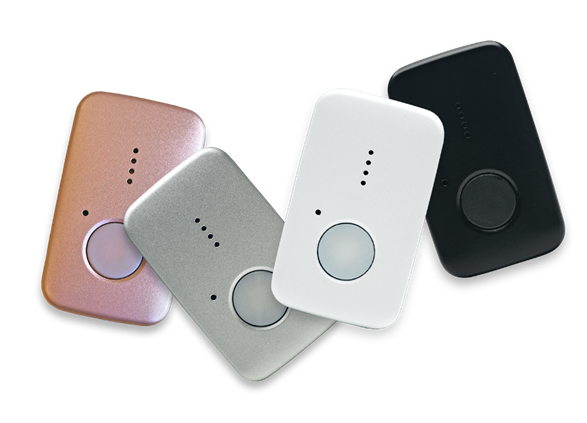
- Simple, lightweight design — must be comfortable and non-threatening enough that the person will accept wearing it
- 24/7 monitoring center — trained specialists understand how to communicate with someone who may be confused or non-verbal


How to introduce a medical alert to someone with dementia Resistance is common. People with dementia often do not understand why they need the device, and may feel that it signals a loss of independence.
Here are strategies that families have found effective:
- Frame it as staying connected, not being watched. 'This means I can always find you if I need to' is less threatening than 'This is for your safety.'
- Involve them in choosing the device. Give them a sense of ownership — let them pick the color or the wearing style.
- Introduce it gradually. Have them wear it for a few hours initially, at home, with you present, so they become accustomed to it.
- Enlist their GP or a trusted person. For some individuals, hearing it from a doctor or a close friend carries more weight than hearing it from a family member.
- Be patient and consistent. It may take several attempts before the device is accepted.
Frequently asked questions: dementia and medical alerts
For mild to moderate dementia, many people can learn a simple task like pressing a button if it is consistently reinforced. However, the primary safety net should be automatic fall detection and GPS — do not rely on a person with dementia to reliably activate a manual alert.
This is a common challenge. Wrist-worn devices are often more readily accepted than pendant styles. Some families use a combination approach: a comfortable wrist device for daily wear and a discreet pendant alternative. The Assured Independence team can advise on approaches for specific situations — contact our care coordination team for personalized guidance.
The Caregiver's Guide to Medical Alert Systems
If you are reading this as a caregiver — an adult child, a spouse, a sibling, or a professional care provider — you already understand that the decision to introduce a medical alert is rarely straightforward. It involves conversations about vulnerability, independence, trust, and sometimes, mortality. This section is written for you.
Starting the conversation
The most common mistake caregivers make is approaching the conversation from a place of fear or urgency. 'You NEED to get one of these' rarely lands well. Instead, frame the device as a tool that supports independence — not one that signals its end.
Try: 'I've been looking at these devices that connect you directly to a monitoring center if you ever need help. It would mean I'd worry less and you'd have more privacy — because I wouldn't feel like I needed to check in on you so often.'
Avoid: 'After what happened last month, we really need to do this. I'm not comfortable with you being alone without it.'
Frequently Asked Questions
A medical alert system with a caregiver app provides real-time visibility into your loved one's safety — including fall detection alerts, location tracking, device battery status, and activity history. Assured Independence's app allows family members to check on their loved one without intruding on their privacy.
Home systems (like the Classic Guardian and Home 2.0) work within the home and are designed for people who primarily need coverage in and around their house. Mobile systems (like the MGMini) work anywhere with cellular coverage and are ideal for seniors who are active and regularly away from home. Many families use one of each.
Compliance is the most common concern caregivers raise. Devices that are lightweight, comfortable, and simple to use have the highest compliance rates. Involving your loved one in choosing the device significantly increases uptake. The MGMini, at under 1.5 oz, is frequently described by users as 'forgettable to wear' — which is exactly what you want.
The Assured Independence Home 2.0 connects via home WiFi and does not require a cellular signal. For rural areas with limited cellular coverage, we recommend discussing your specific location with our team — we can advise on the best coverage option for your situation.